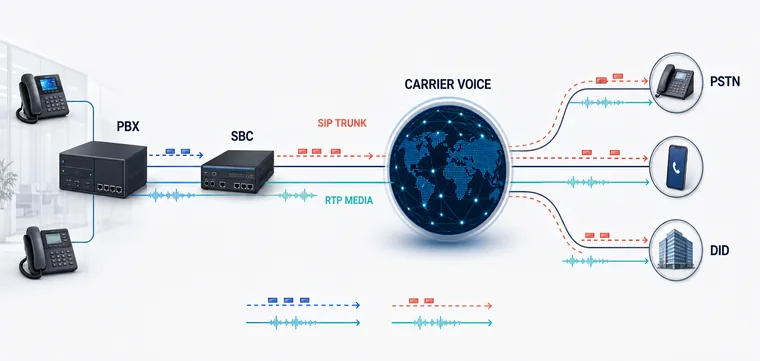
SIP call flow connecting an Asterisk or FreePBX system through a carrier network to telephone destinations

Open PBX voice connectivity

Asterisk and FreePBX SIP Trunking Integration

Globilinks reviews SIP connectivity for Asterisk and FreePBX environments around topology, authentication, codecs, DTMF, number normalization, inbound DIDs, outbound destinations, capacity and failover.

Configuration in contextDriver, version, NAT and security choices shape the trunk.
Number routing alignedInbound and outbound formats are normalized before testing.
Failure paths testedTimeouts, route rejection and failover are part of acceptance.

PBX-to-carrier planning

A reliable SIP trunk begins with an exact map of the PBX and network path.

Asterisk is a communications engine used in many PBX and contact center systems. FreePBX provides a web-based administration layer commonly deployed with Asterisk. Both can connect to external SIP providers, but the correct design depends on the installed version, SIP channel driver, authentication method, network topology and intended call flows.

Globilinks reviews signaling and RTP IPs, NAT and firewall ownership, peer or registration details, transports, codecs, DTMF, caller ID fields, number normalization, inbound DID routes, outbound destinations, calls per second and concurrent capacity. The review separates carrier-side behavior from PBX dialplan and endpoint behavior.

Asterisk and FreePBX are third-party platforms. Globilinks is not affiliated with or endorsed by their respective projects or owners. Customers remain responsible for PBX administration, endpoint security, updates, data and lawful service use; implementation scope is agreed for each environment.

Technical workstream

Prepare, connect, test and operate the SIP trunk.

Version-aware settings and a narrow exposure model reduce avoidable configuration and security problems.

01

Inventory the PBX and network

Record Asterisk and FreePBX versions, the SIP channel driver, extensions and trunks, public and private IPs, NAT, firewall rules, SBC use, DNS dependencies and the administrator responsible for backups and changes.

  • Platform and SIP driver versions
  • Signaling and RTP network path
  • Backup, change and rollback ownership
02

Define the secure trunk profile

Use the agreed authentication model and restrict access to required addresses and ports. Align transport, codecs, DTMF, caller identity, session timers and number formats without publishing credentials or opening unnecessary PBX services.

  • IP allowlisting or agreed registration
  • Codec, DTMF and transport settings
  • Least-exposure firewall rules
03

Build explicit call routing

Normalize outbound numbers to the agreed format and map inbound DIDs to named destinations. Document emergency, premium or restricted patterns, caller ID ownership and the expected behavior when a route is unavailable.

  • Outbound normalization and route order
  • Inbound DID-to-destination mapping
  • Restricted patterns and failover behavior
04

Validate signaling and media

Test two-way audio, DTMF, transfers, hold, voicemail, caller ID, representative destinations, concurrent calls and failure cases. Capture timestamps, call IDs and SIP responses for repeatable escalation.

  • Functional and destination tests
  • Concurrency and bandwidth sample
  • SIP evidence and support contacts

Provider evaluation

How to assess a SIP provider for Asterisk or FreePBX.

Good integration support is version-aware, security-conscious and precise about the boundary between PBX and carrier responsibilities.

Platform awareness

Confirm the provider asks about Asterisk, FreePBX and SIP driver versions rather than supplying a generic configuration that ignores the environment.

Network and security design

Review authentication, IP allowlisting, transport, NAT, RTP ranges, fraud controls and the minimum services exposed to the internet.

Routing clarity

Confirm number formats, inbound DID delivery, outbound route order, caller identity and failure behavior before production calls.

Evidence-led support

Agree on timestamps, call IDs, SIP responses, packet or RTP evidence where appropriate, and ownership across PBX, network and carrier teams.

PBX workflows

SIP connectivity for business calling and voice applications.

Business inbound and outbound

Connect extensions, IVRs and queues to DIDs and approved outbound destinations with defined number formats and capacity.

Hosted or managed PBX

Plan tenant or customer routing, operational ownership, security controls and support evidence around a documented service boundary.

Contact center voice

Support queue and dialer traffic with separate CPS, concurrency, destination, identity and responsible-use requirements.

Buyer guide

Turn the PBX design into a complete carrier brief.

Use the checklist to capture network, call path, capacity, codec, number, failover, pricing and acceptance-test requirements.

Open the SIP checklist

Questions buyers ask

Asterisk and FreePBX SIP questions

Exact settings vary by version and network. Start with these deployment facts.

Does Globilinks support SIP trunks for Asterisk and FreePBX?

Globilinks can review SIP connectivity for documented Asterisk and FreePBX environments. Activation depends on account review, current service availability, network readiness, traffic requirements and an agreed configuration and test scope.

Should a trunk use IP authentication or registration?

The appropriate method depends on the service and network design. Static business environments often use agreed IP authentication, while other deployments may use registration. The method and exposure controls should be confirmed before configuration.

What causes one-way audio on an Asterisk SIP trunk?

Common causes include incorrect public media addresses, NAT, firewall rules, RTP port ranges, asymmetric routing or SDP handling. Troubleshooting should trace signaling and RTP across the PBX, network and provider path.

Can inbound DIDs route to FreePBX IVRs or queues?

DIDs can be delivered to an agreed SIP destination and mapped through FreePBX inbound routes. The delivered number format, destination, busy-hour capacity, overflow and failover should be tested.

Is Globilinks affiliated with Asterisk or FreePBX?

No. Asterisk and FreePBX are third-party platforms, and their names belong to their respective owners. Globilinks provides independent SIP connectivity and integration support for compatible customer systems.

Next step

Start with the PBX version, network path and call flows.

Globilinks will review the trunk profile, inbound and outbound routing, capacity, security controls, failover and acceptance tests with your technical team.

Review your PBX trunk